How to Check a Page’s Bounce Rate in GA4
Measuring bounce rate helps you identify which pages fail to engage visitors and why people leave without interacting. Sometimes the content does not answer what the user was looking for; other times, it simply does not answer it well enough. This metric helps you see where improvements are needed.
What is bounce rate in GA4?
In Google Analytics 4, bounce rate is the percentage of sessions that were not engaged sessions. It is the inverse of the engagement rate. GA4 considers a session a bounce if it lasts 10 seconds or less, does not record a conversion event, and does not include at least two page or screen views. Unlike Universal Analytics, simply viewing a single page is not enough to define a bounce—the key factor is whether the user actually engaged with the site.
How is bounce rate calculated in Google Analytics 4?
It is simple: 100% minus the engagement rate. If a page has a 70% engagement rate, its bounce rate is 30%. A session is considered engaged when it meets at least one of these conditions: it lasts more than 10 seconds, records a conversion event, or includes two or more page or screen views.
Where can I find the bounce rate of a page in GA4?
There are several ways to check it. This is the most direct method:
Step 1: Open GA4 and click “Explore” in the left-hand menu.

Step 2: Create a blank exploration.
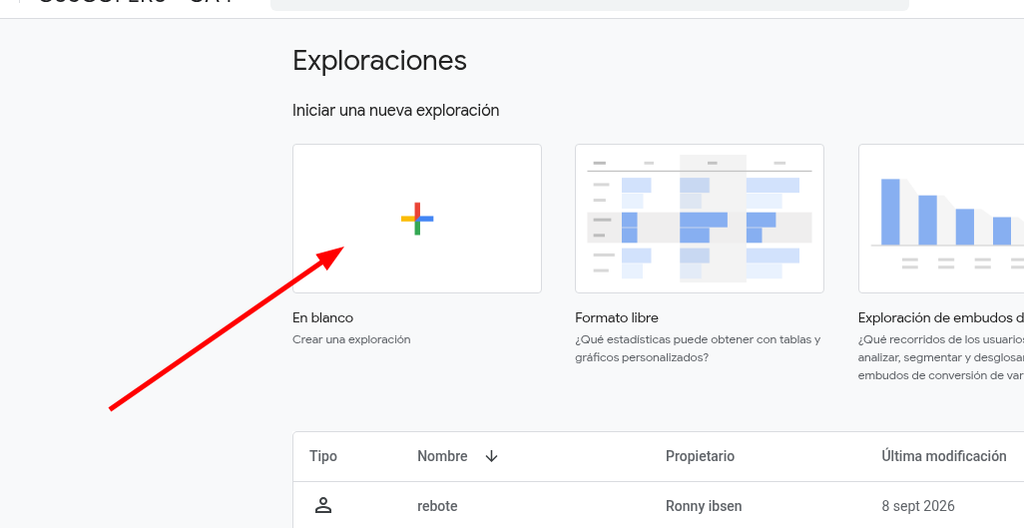
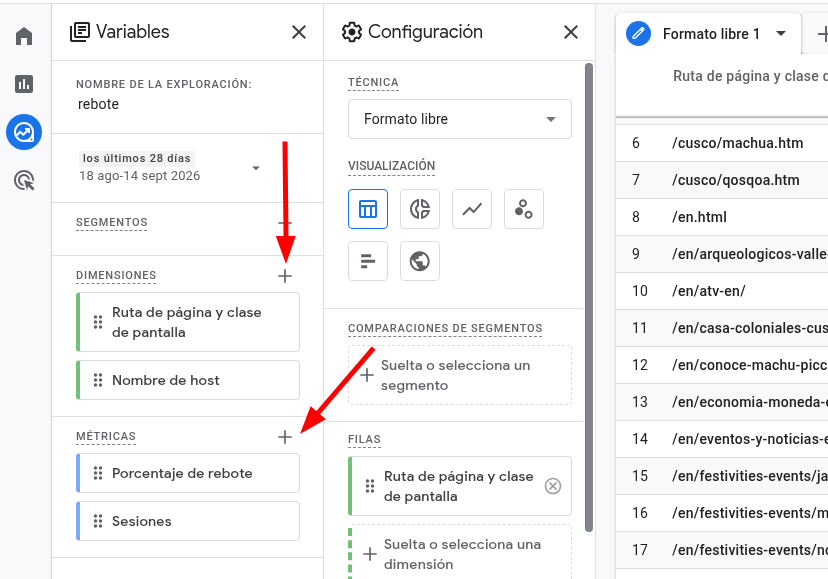
Step 3: In the left-hand column, add the dimensions and metrics shown in the image. “Hostname” is optional: use it only if data from multiple domains is being combined and you need to filter it.
Step 4: Drag the variables into the settings column: add dimensions to “Rows” and metrics to “Values”.
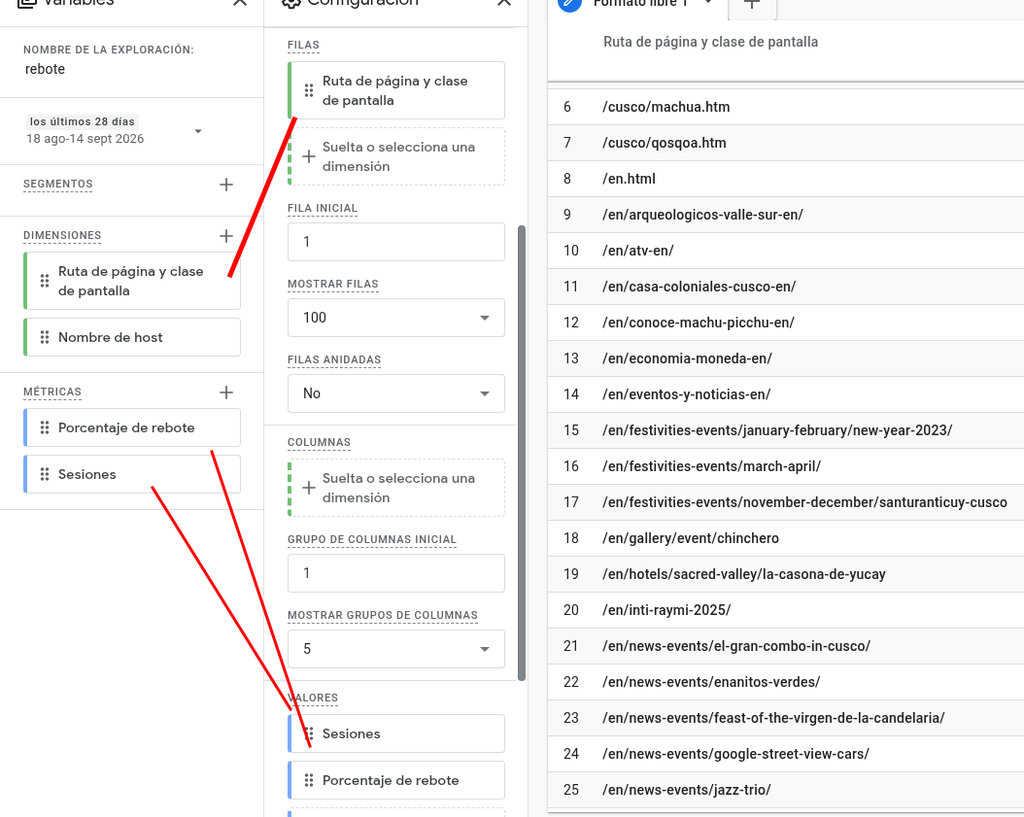
How to check the bounce rate of a specific URL in GA4
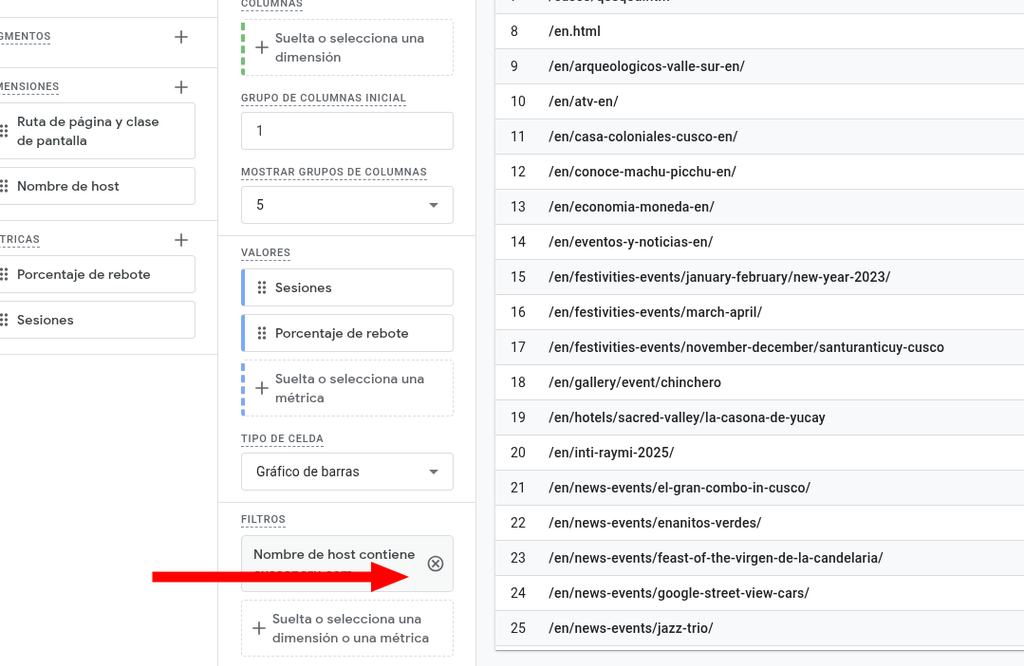
Step 5: At the bottom of the settings panel, click “+” to add a filter. If you have multiple domains, use “Hostname” contains “yourdomain.com”. For a specific URL, filter by “Page path and screen class” to view the bounce rate for that page.
What is a good bounce rate in GA4?
There is no single number that works for every URL. It depends on the type of page and what you want users to do on it. A high bounce rate is not always a bad thing if the page successfully fulfills its purpose.
Bounce rate by page type
Blogs and informational articles
For these pages, a bounce rate between 65% and 90% is common. Many visitors arrive, read the content, find the answer they need, and leave. If the article properly satisfies the search intent, a high bounce rate is not necessarily a problem, especially when time on page is good and there are internal links that encourage further browsing.
Commercial landing pages
A reasonable bounce rate is often between 20% and 45%. The goal is for users to take an action, such as submitting a form, requesting a quote, or making a purchase. If the bounce rate increases significantly, the message, offer, or CTA may not match what visitors expected to find.
Online stores and service pages
For e-commerce websites and service pages, a typical range is 30%–55%. If the rate is higher, it may be worth reviewing trust signals, pricing, product pages, and the overall path toward making a purchase or contacting the business.
Why does my page have a high bounce rate in GA4?
There is usually a specific reason behind a high bounce rate. Start by checking the following:
Slow page load speed
If a page takes too long to load, many visitors will leave before they even see the content. Every additional second can increase the bounce rate. Check image file sizes, caching, and your hosting performance.
Content that does not match search intent
If users cannot find what they were looking for within the first few seconds, they are likely to leave. The title, introduction, and main content should match the search query that brought them to the page from Google.
Poor mobile experience
A large share of website traffic comes from mobile devices. If the layout is difficult to read, buttons are hard to tap, or intrusive pop-ups appear, the bounce rate is likely to increase.
Lack of internal links and calls to action
Without a clear next step, users are more likely to close the tab. Links to related content and visible CTAs can encourage visitors to continue exploring the website.
Frequently asked questions about bounce rate in GA4
Does GA4 still have bounce rate?
Yes. Google initially removed it and later brought it back. It is now calculated as the inverse of the engagement rate, so it does not mean exactly the same thing as it did in Universal Analytics.
Why can’t I see bounce rate in my GA4 reports?
Bounce rate is not included in every report by default. You need to add it as a metric in an exploration or an editable report, as explained in the steps above.
What is a good bounce rate for a website?
It depends on the type of page. For blog content, a bounce rate of 65%–90% can be normal, while commercial landing pages generally perform better within the 20%–45% range. Rather than focusing on a single benchmark, evaluate bounce rate according to the purpose of each URL.
Does bounce rate affect SEO?
Bounce rate is not a direct ranking factor. However, it can be a useful indicator: a very high bounce rate may suggest that the content is not satisfying search intent, which can indirectly affect SEO performance over time.